

 Click image to view full size image


Description:
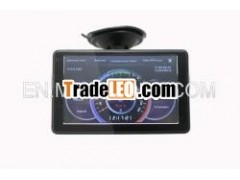
5 inch gps with radar detectorfriendly interface software control radar laser detector
radar detector built in gps
1,Structure
Item | Name | Instructions |
1 | Power On/Off | Push to Power On/Off |
2 | Earphone Socket | Socket for earphone |
3 | TF Socket | Socket of memory card for Map/Radar software/Media |
4 | AV IN | Socket for Audio/Video Input |
5 | USB Socket | Socket of computer communication or power supply |
6 | Reset | Back to Factory setting |
7 | DC 5V | Power Supply for Radar and PND |
8 | On/Off | PND/Radar alert Switch |
‚City/High way Switch |
2, Radar InterfaceSetting
Item | Name | Instructions |
1 | RFConnected | Push "On/Off button choose GPS alert, then PND will show "RD Connected". |
2 | Navi:A | You had Choose Map A as the Navi Path |
3 | alertmute:0km/h | The Recommendation "alert Mute" is 30 Km/h. Radar will not alert if your speed is less than 30km/h to avoid false alarm. |
4 | PositionInvalid | GPS received Signal, Which will display of Position Valid. |
5 | AddLocation | Add fixed Camera Coordinate for device alert when passing the same place next time. |
6 | Navi:A | RD505 can install two maps, Navi A is the first map setting Path |
7 | Navi:B | RD505 can install two maps, Navi B is the second map setting Path |
8 | DelLocation | Delete the saved fixed camera Coordinate |
9 | Setting | Click to enter the Setting Page |
10 | X/K/Ka/KuBand | The band frequency can be optional |
11 | Navi:ASetting | Set the first map path |
12 | Navi:BSetting | Set the Second Map path |
13 | alertMute | The Recommendation "alert Mute" is 30 Km/h. Radar will not alert if your speed is less than 30km/h to avoid false alarm. |
14 | TrafficLighting | The fixed Traffic Lighting Coordinate need customer add themself |
15 | CameraAlarm | The Camera Coordinate need customer add themself |
16 | Spot | Customer can set the alarm window position on the PND Screen |
17 | Speaker | Volume increase or decrease |
3, TechnicalSpecifications
RadarFrequency
Band | Frequency |
X-Band | 10.525~10.62GHZ±20MHZ |
Ku-Band | 13.32~13.54GHZ±20MHZ |
K-Band | 23.9~24.3GHZ±20MHZ |
Ka-Band | 34.1~35.82GHZ±20MHZ |
Laser Beam | 800~1100NM |
RadarHardware
Measurements(mm) | 35H×85W×130L |
Volts input DC | 12V-15V |
Currency Input | 150~300mA |
Operation Temp. | -25°C~85°C |
Storage Temp. | -30°C~105°C |
4,Troubleshooting
Problem | Solution |
RF Unconnected | Make sure DC plug charger is connected |
GPS no alert | Make sure On/off button is set as GPS Alarm |
Make sure car speed is above alert Mute | |
Some band can not detected | Please mark the band in setting page |
High clear 5 inch touch screen GPS Radar Detector
